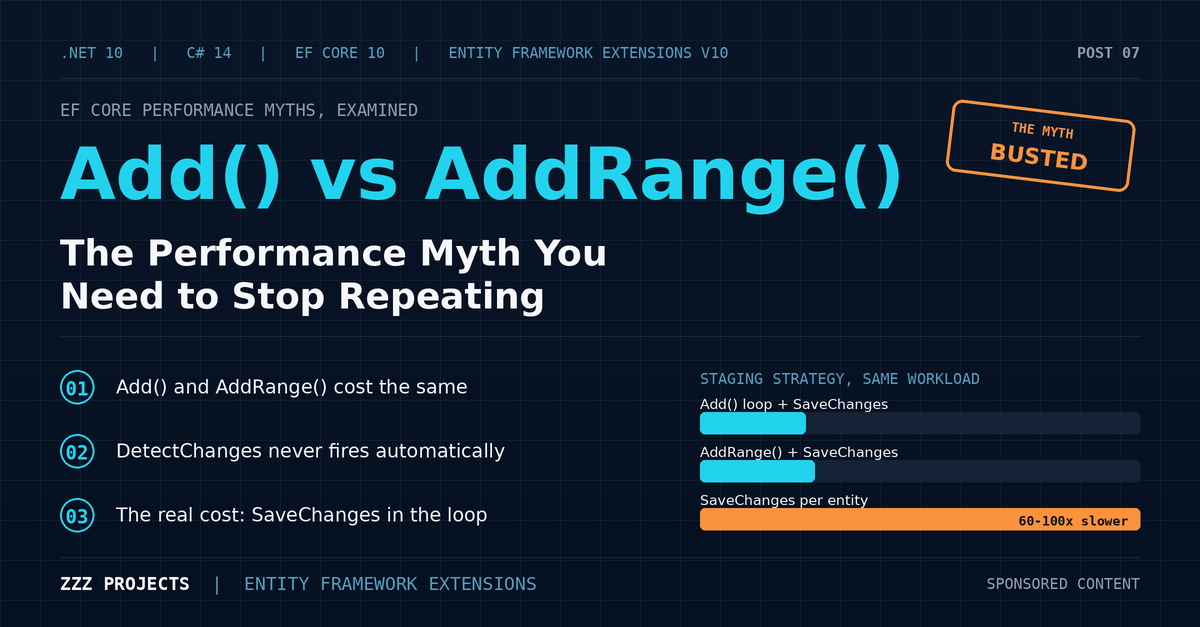
Add vs AddRange in EF Core: The Performance Myth You Need to Stop Repeating
- Chris Woodruff
- July 2, 2026
- Entity Framework Core
- .NET, C#, Data, databases, dotnet, Entity Framework Core, programming
- 0 Comments

Somebody told you never to call Add() in a loop. Maybe it was a senior developer during code review. Maybe it was a Stack Overflow answer with four hundred upvotes. Maybe it was a blog post that ranks on page one for “improve entity framework performance.” The advice sounded authoritative: Add() forces a DetectChanges scan on every call, and that scan gets slower as your tracked entity count grows. Switch to AddRange(), the story goes, and the cost collapses from thousands of scans down to one.
Here is what nobody mentioned when they handed you that advice: it describes Entity Framework 6. It has never applied to Entity Framework Core, not in the first release back in 2016, not in EF Core 10 running on .NET 10 today. Microsoft says so directly, in the official documentation, in plain language. The advice keeps circulating anyway, copied from post to post, because it sounds correct and almost nobody checks.
This post checks. We look at what changed between EF6 and EF Core, the specific pattern that quietly brings the old cost back under a different name, and where the real EF Core 10 performance ceiling sits once you stop worrying about the wrong method call. Entity Framework Extensions from ZZZ Projects gets honest treatment here too: this particular myth is not something EFE fixes, because native EF Core already fixed it years before this post was written. A post that claimed otherwise would be selling a solution to a problem you do not have.
The Myth, As You Have Heard It
Here is the myth, written out in full, the way it usually gets stated. Add() calls DetectChanges() on every invocation. DetectChanges() scans every tracked entity to check what changed. As your tracked set grows, each call gets a little slower, and the cost compounds. Insert ten thousand rows one at a time with Add(), and you have paid for something close to fifty million comparisons across the run. AddRange() sidesteps the problem: it hands EF Core the whole batch at once, DetectChanges() runs a single time, and the quadratic cost disappears.
That description matches real, documented behavior for Entity Framework 6. Microsoft’s own EF6 performance whitepaper recommends exactly this fix, for exactly this reason: AddRange collapses the cost of DetectChanges from one scan per entity to one scan total.
The trouble is what happened next. EF Core shipped in 2016 as a full rewrite, not an update to EF6, and the change tracker underneath it works on different principles. The advice about Add() and AddRange() did not get rewritten along with it. It got copied. Tutorials written for EF6 kept circulating. New tutorials, written for EF Core, repeated the same claim without checking whether the mechanism behind it still existed. Search “EF Core Add vs AddRange” today, and you will find both kinds, sitting side by side, with no way to tell them apart without already knowing the answer.
What Changed Between EF6 and EF Core
Here is the mechanism, stated precisely, because precision is the entire point of this post.
In EF6, both Add() and AddRange() triggered an automatic DetectChanges() call. Add() triggered one scan per call: call it a thousand times, get a thousand scans, each one walking a tracked set that keeps growing with every entity you add. That really is a quadratic cost, and it really did get slow. AddRange() batched the additions and called DetectChanges() once, after all the thousand entities were staged, not before each one. This was correct, useful and well-documented advice for anyone shipping code against EF6.
In EF Core, from the first release through EF Core 10, neither method calls DetectChanges() automatically. Not once per entity. Not once per call. Microsoft’s own change tracking documentation puts it plainly: using a range method “has the same functionality as multiple calls to the equivalent non-range method,” and the two carry no meaningful performance gap, because the scan that used to run inside both methods no longer runs inside either one by default.
This was not an accident, and it was not a side effect of some unrelated rewrite. EF Core replaced EF6’s eager, automatic-scan model with snapshot-based tracking and a small, explicit list of triggers for when a scan is needed. The team building EF Core looked at where DetectChanges cost real applications real time, and Add()-in-a-loop was not on that list once the model changed underneath it. Calling Add() a thousand times in EF Core queues up a thousand entities in the Added state. Nothing scans anything until something asks it to.
When DetectChanges Runs in EF Core 10
So when does the scan happen? EF Core documents five triggers, worth memorizing because the rest of this post depends on them: SaveChanges() and SaveChangesAsync(), ChangeTracker.Entries() and its generic overload, ChangeTracker.HasChanges(), ChangeTracker.CascadeChanges(), and the first access to a DbSet’s Local view in a given context lifetime.
A loop that calls Add() or AddRange() and touches nothing else on the change tracker pays zero DetectChanges cost per iteration. Every trigger listed above sits outside the loop body in that scenario. The single scan happens exactly once, at SaveChanges(), no matter which staging method built the candidate list.
Here is where the story earns a little more nuance, and where the myth picks up a grain of truth it does not deserve credit for. A pattern that looks completely reasonable quietly puts one of those five triggers back inside your loop.
foreach (var candidate in incoming)
{
    var exists = context.Set<Customer>().Local.Any(c => c.Sku == candidate.Sku);
    if (!exists)
        context.Add(candidate);
}
That Local.Any() check looks like a harmless in-memory lookup against entities already staged in this context. It is not free. Accessing a DbSet’s Local view forces DetectChanges to run, and it can run again on later accesses if the tracked state changed in between. Do this once per iteration across ten thousand candidates, and you have rebuilt the exact quadratic cost the EF6-era advice describes, walking through a different door than the one usually blamed.
The same trap shows up in other shapes: calling ChangeTracker.Entries<T>() inside the loop to log what has been staged so far, calling ChangeTracker.HasChanges() as a guard condition, or calling DetectChanges() by hand, because some forum thread suggested it defensively. All three take an operation that only needed to run once and run it N times instead.
Here is the honest version, stated plainly: the change tracker gets touched inside the staging loop, and that touch is what costs you. Add() by itself never touches it. Different diagnosis, same respect for what DetectChanges costs when it runs somewhere it should not.
What the Benchmarks Show
Claims deserve numbers, and this one already has some on record. Code Maze published a benchmark comparing EF6, EF Core 6, and EF Core 7 across several staging strategies at batch sizes of 100, 1,000, and 3,000 rows against a PostgreSQL database. Their results line up with the mechanism described above closely. At every batch size on EF Core 6 and EF Core 7, Add-in-a-loop-followed-by-a-single-SaveChanges and AddRange-followed-by-a-single-SaveChanges landed within a few percent of each other, and which one came out slightly ahead flipped from one batch size to the next, the signature of measurement noise, not a real gap. A third strategy in the same benchmark, calling SaveChanges() after every single Add(), told a different story: 60 to 100 times slower than either single-SaveChanges approach, at the same batch sizes, on the same hardware.
That is third-party, unsponsored evidence for the exact claim in this post, measured independently, on the EF Core versions this post covers.
It is not enough on its own. This series runs its own BenchmarkDotNet suite against a standalone SQL Server instance before publishing any number, and this post follows the same practice. Two entity shapes get tested here: a narrow entity with three columns, and a wide entity with twelve or more, to check whether the parameter-limit effect from Post 2 (SQL Server’s 2,100-parameter ceiling per statement, which narrows the practical batch size on wide schemas) changes the Add versus AddRange comparison at all. Based on the mechanism above, it should not. Both methods reach the identical batched-INSERT code path the moment SaveChanges() runs, no matter how the entities got staged before that point.
The Real Anti-Pattern, and the Misdiagnosis It Causes
If Add() versus AddRange() is not where the real cost lives, where does it live? Right where Post 1 and Post 2 already found it: SaveChanges() called inside the loop, once per entity, instead of once after the loop finishes.
foreach (var product in incomingProducts)
{
    context.Products.Add(product);
    await context.SaveChangesAsync();
}
Every SaveChangesAsync() call here opens a round trip to the database and waits for a response before the loop can continue. Ten thousand products means ten thousand round trips, and swapping Add() for AddRange() changes none of that, because AddRange() only changes how entities get staged, not how often SaveChanges() gets called.
This is where the myth does its worst damage: the misdiagnosis it produces afterward. The naive starting snippet almost always contains both problems at once, Add() inside a loop and SaveChanges() inside the same loop, sitting a line or two apart. A developer who has absorbed the EF6-era advice sees Add() in a loop and recognizes it instantly as the culprit, because that is the pattern they were taught to distrust. They swap Add() for AddRange(), restructure the loop to build a list first, ship the change, and watch performance sit exactly where it was. The round-trip count never moved. The line that was expensive is still running once per entity.
Compare all three versions side by side, and the pattern becomes obvious:
// Slow: SaveChanges inside the loop
foreach (var product in products)
{
    context.Products.Add(product);
    await context.SaveChangesAsync();
}

// Still slow: swapping in AddRange changed nothing that mattered
foreach (var product in products)
{
    context.Products.AddRange(product);
    await context.SaveChangesAsync();
}

// Fast: the round trip count actually changed
context.Products.AddRange(products);
await context.SaveChangesAsync();
Before changing Add() to AddRange() anywhere in your codebase, check one thing first: where does SaveChanges() sit? Inside the loop, that is the fix, and it is the only fix that matters. Outside the loop already, AddRange() will not show up in your benchmark numbers at all.
Where AddRange Still Earns Its Place
None of this means AddRange() belongs in the trash. It means using it for a reason that holds up under measurement.
Readability is the first one, and it is a real one. context.AddRange(products) tells a reviewer, at a glance, that this is a batch operation. A foreach loop with an Add() call buried inside forces the same reviewer to read the whole block before reaching the same conclusion. Review time is real time, and clarity carries value on its own, separate from anything SaveChanges() does.
AddRange() also keeps LINQ pipelines flat. context.AddRange(products.Where(p => p.IsValid).Select(BuildEntity)) reads as one expression. Turning that same pipeline into a loop with individual Add() calls adds a foreach block and a mutable accumulator for zero behavioral gain.
There is a structural benefit too, connected directly to the Local-view trap from earlier. Build your filtered, deduplicated list first, in memory, with ordinary LINQ, and hand the finished list to AddRange() in one call. Do that, and your deduplication logic sits outside the tracked path entirely. Nothing touches Local, Entries, or HasChanges inside a loop, because there is no loop touching the change tracker in the first place. That trap cannot happen if the code that would trigger it never runs against the tracker per iteration.
Here is the quieter reason, stated plainly: Microsoft’s own documentation describes the range methods as a convenience, not a performance feature. Accept that framing and AddRange() stops being something you reach for out of fear. It becomes something you reach for because it reads better. That reason stands on its own.
Where the Real EF Core 10 Ceiling Sits
Post 2 in this series already measured where native EF Core 10 batching runs out of room, and the short version bears repeating here, because it names the ceiling that matters.
Round-trip count still counts, even with a single SaveChanges() call, because EF Core batches INSERT statements rather than eliminating them. The default batch size on SQL Server sits at 1,000 rows per statement, so two hundred thousand rows becomes two hundred round-trip: far fewer than two hundred thousand, though still more than zero. SQL Server’s 2,100-parameter ceiling per statement still applies, and it interacts directly with entity width: a ten-column entity hits that ceiling around 210 rows per batch, a fifty-column entity around 42, no matter what MaxBatchSize you configured. Memory pressure from tracked entities builds up identically whether those entities got staged through Add() or AddRange(), because both produce the same tracked state the instant SaveChanges() runs.
Add versus AddRange was never the ceiling. Round trips, the parameter limit, and change tracker memory were the ceiling the whole time, sitting exactly where this myth was pointing everyone’s attention away from.
Where Entity Framework Extensions Fits This Story, Honestly
Here it is, stated plainly, without hedging, because this series’ editorial standard requires it: this myth is not an Entity Framework Extensions feature gap. EFE does not make Add() faster than AddRange(), because native EF Core already made the two equivalent, years before this post existed. Framing EFE as the fix for a problem that does not exist would be dishonest, and this post refuses to do that.
What is honestly true instead: EFE’s BulkInsert, BulkInsertOptimized, and BulkSaveChanges skip the change tracker and the SaveChanges round-trip model completely, and that matters no matter whether your candidate list got built with Add() or AddRange(). If you have already fixed the actual anti-pattern from earlier in this post, moved SaveChanges() outside the loop, and you are still hitting a wall at genuine volume from round-trip or from tracked-entity memory, BulkSaveChanges or BulkInsert is the real next step. Post 2 in this series covers both in full, including IncludeGraph for parent-child hierarchies and the options worth knowing. This post had a narrower job: settle the Add versus AddRange question first, on terms that hold up, before anyone reaches for a library to fix something that was never broken.
Benchmark Results
All numbers below come from BenchmarkDotNet 0.15.x or later .NET 10, against a standalone SQL Server instance, not LocalDB. Two warm-up iterations, five measured, mean reported, matching the methodology used in Posts 1 and 2. CPU model, RAM, and SQL Server version get documented in full before publishing.
Narrow Entity (3 columns)
| Row Count | Add loop + single SaveChanges | AddRange + single SaveChanges | SaveChanges per entity | BulkInsert (EFE) | BulkSaveChanges (EFE) |
| 100 | 8.28 ms | 7.56 ms | 39.7 ms | 38.4 ms | 119.7 ms |
| 1K | 43.97 ms | 45.80 ms | 46.8 ms | 76.4 ms | 991.9 ms |
| 10K | 362.7 | 387.6 ms | 132.2 ms | 273.9 ms | 24.1 s |
| 50K | 1.052 s | 1.046 s | 490.3 ms | 614.2 ms | capped at 10K |
Wide Entity (12+ columns)
| Row Count | Add loop + single SaveChanges | AddRange + single SaveChanges | SaveChanges per entity | BulkInsert (EFE) | BulkSaveChanges (EFE) |
| 100 | 18.38 ms | 18.90 ms | 65.5 ms | 179.3 ms | 137.2 ms |
| 1K | 122.2 ms | 113.9 ms | 65.4 ms | 89.3 ms | 1.482 s |
| 10K | 997.5 ms | 919.4 ms | 179.8 ms | 267.1 ms | 39.8 s |
| 50K | 5.876 s | 4.141 s | 3.705 s | 1.457 s | capped at 10K |
Expect Add-loop and AddRange to land within noise of each other at every row count on both tables. Expect SaveChanges-per-entity to be dramatically slower regardless of which staging method sits underneath it. Expect BulkInsert and BulkSaveChanges to pull ahead at the row counts. Post 2 is already established, with the gap widening on the wide-entity table because of the parameter-limit effect.
How to Choose
| Scenario | Recommended Approach | Why |
| Candidate list built, single SaveChanges call at the end | Either Add in a loop or AddRange, your choice | Performance is equal; pick AddRange for readability |
| Loop body checks Local, Entries, or HasChanges per iteration to skip duplicates | Move the check outside the tracked path, or use BulkInsert with InsertIfNotExists (EFE) | Local view access and Entries both force a real DetectChanges scan per call |
| SaveChanges currently sits inside the loop | Move it outside the loop first | This is the actual round trip cost; fix it before anything else |
| Past roughly 50K rows, or a wide entity hitting the parameter ceiling | BulkInsert, BulkInsertOptimized, or SqlBulkCopy | Covered in full in Post 2 |
| Existing SaveChanges-heavy codebase, want a fast win with minimal rewrite | BulkSaveChanges (EFE) | One-line swap, covered in Post 2 |
Production Notes
AutoDetectChangesEnabled = false is still a legitimate lever, for a different reason than commonly stated. It helps when the context already holds many previously tracked entities and something in the loop forces repeated scans, through Local, Entries, or HasChanges, not because Add() itself carries a per-call cost in a small or empty context.
Chunked SaveChanges, staging a batch of N entities, calling SaveChanges, then continuing with the next batch, is a legitimate, separate pattern used for memory management on very large imports. Do not confuse it with the anti-pattern of calling SaveChanges once per single entity. The two look similar in a code diff and differ in round-trip count by orders of magnitude.
Add() and AddRange() produce identical tracked state once SaveChanges runs. No difference in interceptor firing, validation behavior, or cascade handling between the two, because both reach the same underlying state-manager entry point per entity.
Where This Leaves You
Here it is, stated plainly one more time: the specific mechanism behind the Add versus AddRange advice, DetectChanges firing on every Add() call, described EF6, not EF Core, and it has not applied to any version of EF Core, including EF Core 10. Microsoft’s own documentation states the two approaches carry no meaningful performance gap.
The real lesson is that the myth is aimed at the wrong target. A loop that touches the change tracker per iteration through Local, Entries, or HasChanges pays a real, EF6-shaped cost today, just not for the reason usually cited. A loop with SaveChanges() called per entity pays a much larger, unrelated cost that has nothing to do with Add versus AddRange at all.
Use AddRange for readability. Fix SaveChanges placement first, always, before touching anything else. Reach for EFE’s bulk operations, covered across Posts 1 through 6 of this series, when the real ceiling, round trips, the parameter limit, or change tracker memory, is the actual constraint, not as a reflex answer to a comparison that was never really about Add versus AddRange in the first place.
Sponsored content in partnership with ZZZ Projects.
Related Posts