Pagination in Entity Framework Core: Why Skip/Take Falls Apart on Hot Tables
- Chris Woodruff
- May 30, 2026
- Entity Framework Core
- .NET, C#, Data, databases, dotnet, Entity Framework Core, programming
- 0 Comments

If you’ve built an ASP.NET Core API or list view backed by Entity Framework Core, you’ve almost certainly written something like this:
var page = await _db.Orders
    .OrderBy(o => o.Id)
    .Skip((pageNumber - 1) * pageSize)
    .Take(pageSize)
    .ToListAsync();
It works. It matches the page-number UI most users expect. Every EF Core tutorial uses it.
It’s also the wrong default once your table grows beyond a few hundred thousand rows or begins seeing concurrent writes. This post walks through why, shows the alternative, keyset pagination and benchmarks the two approaches against a 1M-row SQL Server table.
A runnable sample repo is at https://github.com/cwoodruff/EFCoreDemos/tree/main/EFCoreDemos/ef-pagination-benchmark
The standard approach: offset pagination
Offset pagination, Skip(n).Take(m) in LINQ, translates to SQL Server’s OFFSET ... FETCH NEXT:
public async Task<List<Order>> GetPageAsync(int pageNumber, int pageSize)
{
    return await _db.Orders
        .OrderBy(o => o.Id)
        .Skip((pageNumber - 1) * pageSize)
        .Take(pageSize)
        .ToListAsync();
}
The generated T-SQL looks like:
SELECT [o].[Id], [o].[CustomerId], [o].[CreatedAt], [o].[Total]
FROM [Orders] AS [o]
ORDER BY [o].[Id]
OFFSET @__p_0 ROWS FETCH NEXT @__p_1 ROWS ONLY;
It’s popular for good reasons: the API is intuitive (?page=3&size=20), it composes cleanly with other IQueryable operations, and you can easily compute total page counts with a separate CountAsync(). For small tables and admin-style UIs, it’s fine.
Why offset breaks down
Two problems show up as scale and concurrency increase.
1. Performance degrades linearly with offset depth
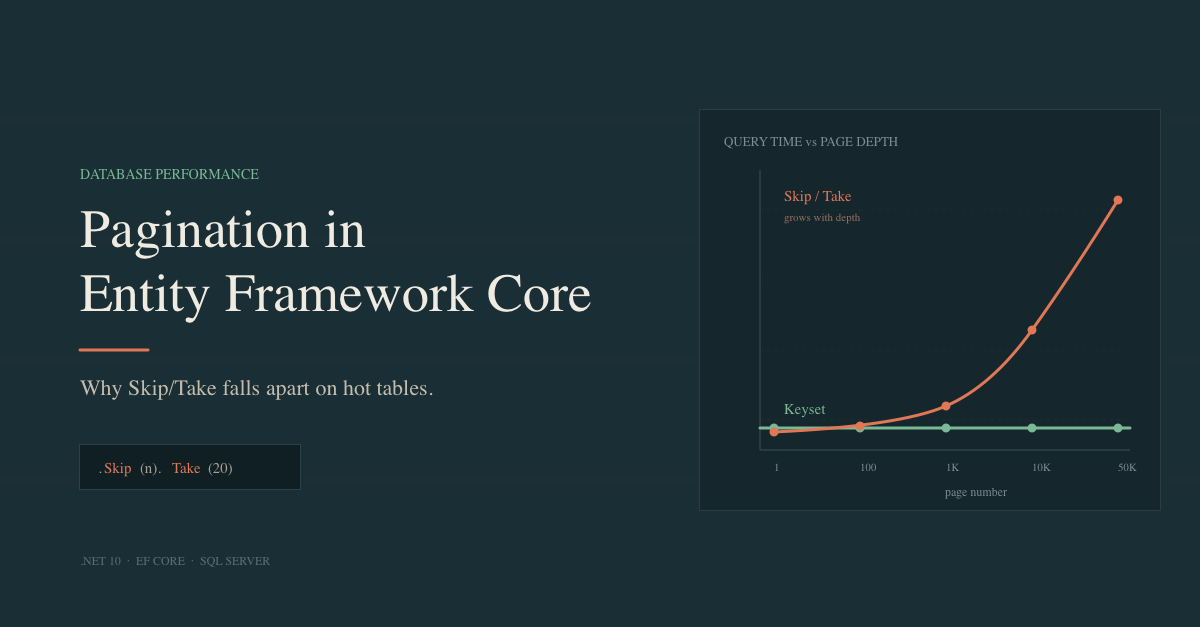
OFFSET 10000 doesn’t mean “jump to row 10,001.” It means “read rows 1 through 10,000, throw them away, then return the next batch.” Even with a perfect index on the ORDER BY column, SQL Server still has to traverse and discard every skipped row. The deeper the page, the slower the query.
This is a property of the SQL standard, not a SQL Server quirk. PostgreSQL and MySQL behave the same way.
2. Results become unstable under concurrent writes
This is the subtler problem and the one that matters most for production APIs. Offset is positional: page N means “rows N×size through (N+1)×size in the current sort order at this instant.” If the underlying set changes between requests, positions shift.
Consider an order-management dashboard, sorted by Id ascending, 20 rows per page:
- T=0: A user loads page 1. They see orders with IDs 1 through 20.
- T=1: An admin deletes order 15. Total row count drops by one. Every order with
Id > 15shifts up by one position. - T=2: The user clicks “next.” The API runs
OFFSET 20 FETCH NEXT 20. But the row that was at position 21 (order 21) is now at position 20. So the query returns orders starting from what used to be position 22, order 22 onward. Order 21 is silently skipped.
The reverse pattern is just as bad. If a new order is inserted while the user is on page 1, every later position shifts down by one and when they click “next,” they see one of the rows from page 1 again. From the user’s perspective, the same record appeared twice across two consecutive pages.
For a finance dashboard, an audit log viewer, or a customer-facing order history, “occasionally drops or duplicates a row when the table is busy” is a real bug, not a theoretical one. It’s also nearly impossible to reproduce on demand, which makes it the worst kind of bug.
The fix: keyset pagination
Keyset pagination (also called cursor or seek pagination) reframes the question. Instead of “give me rows 41–60,” you ask “give me the next 20 rows after the last one I saw.” The “last one I saw” is identified by a stable key, typically the primary key.
Simple case: ordering by primary key
public async Task<List<Order>> GetPageAsync(int? afterId, int pageSize)
{
var query = _db.Orders.AsQueryable();
if (afterId.HasValue)
query = query.Where(o => o.Id > afterId.Value);
return await query
.OrderBy(o => o.Id)
.Take(pageSize)
.ToListAsync();
}
The first request passes afterId = null and gets rows 1–20. The response includes the last row’s Id, which the client passes back as afterId on the next request. The generated SQL is a clean index seek:
SELECT TOP(@__p_1) [o].[Id], [o].[CustomerId], [o].[CreatedAt], [o].[Total]
FROM [Orders] AS [o]
WHERE [o].[Id] > @__afterId_0
ORDER BY [o].[Id];
SQL Server uses the clustered index on Id to seek directly to the cursor position. No scan, no discard. The cost is the same whether you’re on page 1 or page 100,000.
Composite case: non-unique ordering keys
Ordering by Id is the easy case. More often you want to order by something like CreatedAt, which isn’t guaranteed unique. If two rows share a CreatedAt value, a naive Where(o => o.CreatedAt > lastDate) could skip one of them.
The fix is a tuple comparison: order by (CreatedAt, Id) and use the primary key as a tiebreaker.
public async Task<List<Order>> GetPageAsync(
DateTime? afterDate, int? afterId, int pageSize)
{
var query = _db.Orders.AsQueryable();
if (afterDate.HasValue && afterId.HasValue)
{
query = query.Where(o =>
o.CreatedAt > afterDate.Value ||
(o.CreatedAt == afterDate.Value && o.Id > afterId.Value));
}
return await query
.OrderBy(o => o.CreatedAt)
.ThenBy(o => o.Id)
.Take(pageSize)
.ToListAsync();
}
For this to perform well, you need a composite index matching the sort order:
CREATE INDEX IX_Orders_CreatedAt_Id ON Orders(CreatedAt, Id);
Cursor encoding for public APIs
Exposing raw IDs as cursors is fine internally, but for public APIs, it’s worth encoding them both to signal opacity (clients shouldn’t parse or increment cursors) and to bundle composite keys into a single token:
public static string Encode(DateTime createdAt, int id)
{
    var json = JsonSerializer.Serialize(new { createdAt, id });
    return Convert.ToBase64String(Encoding.UTF8.GetBytes(json));
}
The response then looks like { "items": [...], "nextCursor": "eyJjcmVhdGVkQXQiOi..." }.
“Newest first” pagination
Most real-world feeds sort in descending order, newest orders, latest messages and most recent log entries. The keyset logic just flips:
public async Task<List<Order>> GetPageAsync(int? beforeId, int pageSize)
{
var query = _db.Orders.AsQueryable();
if (beforeId.HasValue)
query = query.Where(o => o.Id < beforeId.Value);
return await query
.OrderByDescending(o => o.Id)
.Take(pageSize)
.ToListAsync();
}
The cursor is now the smallest Id seen on the current page, and you fetch everything strictly less than it. SQL Server can scan the clustered index backward, so performance is identical to the ascending case. The same pattern extends to composite keys: order by CreatedAt DESC, Id DESC, and flip the tuple comparison to use < instead of >.
Benchmark
I ran BenchmarkDotNet against a SQL Server table seeded with 1,000,000 Order rows, with a clustered index on Id. Each benchmark fetches a 20-row page at various depths.
Test environment: [fill in: .NET version, SQL Server version, hardware, whether DB is local or remote]
| Page position | Offset pagination | Keyset pagination |
|---|---|---|
| Page 1 (rows 1–20) | 301.6 us | 294.1 us |
| Page 100 (rows 1,981–2,000) | 702.8 us | 310.4 us |
| Page 1,000 (rows 19,981–20,000) | 3,535.9 us | 308.6 us |
| Page 10,000 (rows 199,981–200,000) | 30,788.6 us | 307.4 us |
| Page 50,000 (rows 999,981–1,000,000) | 153,430.9 us | 306.4 us |
The shape of the result is predictable: offset times grow roughly linearly with page depth, while keyset times stay essentially flat. The first page is comparable for both, as the divergence appears as the offset depth increases.
A useful way to verify this on your own data is to capture the actual execution plans (SSMS, or EXPLAIN equivalents in Azure Data Studio). The offset query at depth shows a Clustered Index Scan with a high “Number of Rows Read” relative to “Actual Number of Rows”; that ratio is the cost you’re paying. The keyset query shows a Clustered Index Seek with rows read equal to rows returned.
You can reproduce this with the sample repo: dotnet run -c Release --project Benchmarks.
Trade-offs: when to use which
Keyset isn’t a blanket replacement. Its main limitation is that you can only move forward (or backward, with a mirrored query) you can’t jump to “page 47” because page 47 has no stable definition when rows are shifting.
Use keyset pagination for:
- Public REST APIs, especially with
nextCursortokens - Infinite-scroll and “load more” UIs
- Background exports and data sync
- Any table with heavy concurrent writes
- Deep pagination over large datasets
Offset pagination is still fine for:
- Small tables (under ~10K rows) where the scan cost is negligible
- Admin UIs that genuinely need “jump to page N” with a total page count
- Internal tools where the data is mostly static
Some applications use a hybrid: offset for the visible page-number UI on small datasets, keyset for the API endpoints that power infinite-scroll feeds.
Practical tips
A few things worth knowing once you commit to keyset:
- Index your ordering key. For PK ordering this is free (the clustered index). For other columns, add an explicit index composite if you’re using a tiebreaker.
- Match your index to your sort order exactly. An index on
(CreatedAt, Id)ASC won’t help a query ordering byCreatedAt DESC, Id DESCunless SQL Server can scan it backward (it usually can, but verify with an execution plan). - Handle the empty cursor. First-page requests have no
afterId. Your code needs to skip theWhereclause entirely rather than passing a sentinel value. - Document the ordering. Keyset cursors are tied to a specific sort order. If a client switches from “newest first” to “oldest first” mid-pagination, the cursor is meaningless.
- Use
AsNoTracking()for read-only pages. Pagination endpoints almost never need change tracking. Skipping it cuts allocations and CPU noticeably on large result sets and makes the EF Core overhead invisible next to the query itself. - Filters compose normally, but watch your indexes. A
Where(o => o.CustomerId == x)combined with keyset pagination is fine, but the supporting index now needs to cover both the filter column and the sort key, e.g.,(CustomerId, Id)rather than just(Id). Without a matching composite index, the query falls back to a scan and you’ve lost the benefit. - Don’t expose total counts unless you need them. A
COUNT(*)over a large table is itself an expensive scan and partially defeats the point of fast keyset queries. If you must show “X total results,” consider caching the count or using an approximate value.
Conclusion
Skip().Take() isn’t wrong. It’s misapplied. For small, mostly-static tables and admin UIs that need page numbers, it’s the simplest thing that works. But for anything resembling a production API over a real-world table, keyset pagination gives you both better performance under depth and correct results under concurrency. The implementation cost is small: a Where clause, a stable sort order, and a cursor in your response shape.
The next time you reach for Skip, ask whether your users will ever paginate past row 1,000, and whether the underlying table sees writes while they’re paginating. If the answer to either is yes, switch to keyset.
Related Posts